Plugin for WooCommerce online shops · UPN slip with QR code · v2.0

The UPN QR code your customer pays with one scan.

WooQR UPN adds a ZBS-standard UPN QR code (the payment QR code Slovenians know from paper payment slips) and the full UPN payment slip PDF to every WooCommerce bank-transfer order. The customer scans it in their Slovenian mobile banking app; the bank fills in IBAN, amount and reference. No typing, no mistyped references, no third-party services.

Confirmed in production Intesa Sanpaolo, Delavska hranilnica • 20+ Slovenian shops • Local: data never leaves your server • 14-day refund

What your customer receives

The full UPN slip, QR code included.

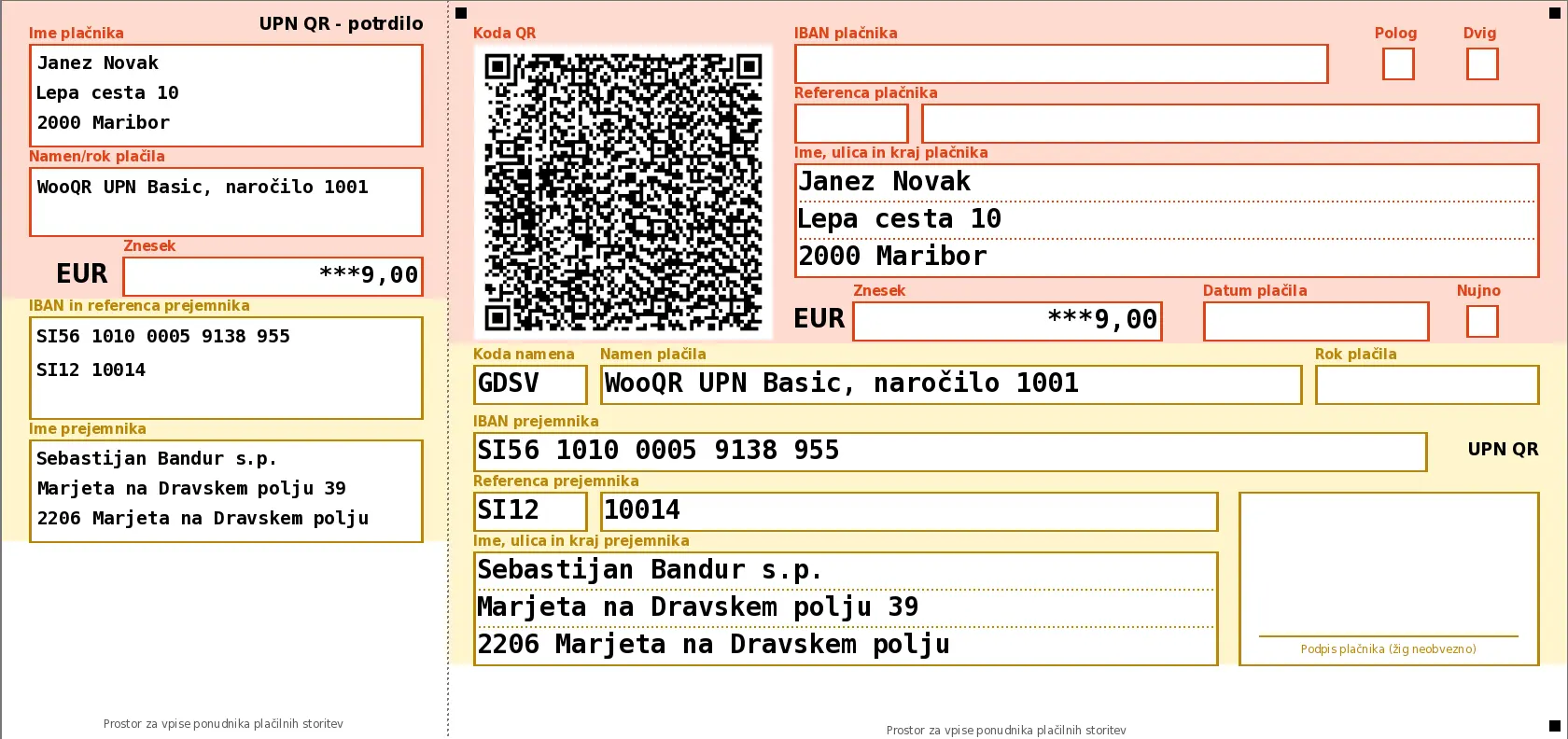
The plugin draws the universal payment order (UPN) form with its QR code to the millimetre coordinates of the Bank Association of Slovenia's technical standard: receipt, order, QR code, recipient, amount, reference and buyer details. As an image on the thank-you page, as a PDF in the e-mail.

Sample UPN payment slip with QR code generated by WooQR UPN: recipient Sebastijan Bandur s.p., amount EUR 9,00, reference SI12 10014, purpose WooQR UPN Basic, order 1001, no due date, payer Janez Novak

UPN QR form per the ZBS standard, machine-filled: receipt on the left, order with QR code on the right. The buttons below switch the plan; the slip image changes.

Slip for plan
Send your invoice and licence details, pay the slip by scanning. Key and invoice arrive after the transfer.
1

QR code per the ZBS standard

UPN QR v2: ISO-8859-2 with an ECI header, version 15, level M, control length. Exactly what Slovenian mobile banks read.

2

Reference with check digit

SI12 10014: model, order number and a modulo-11 check digit. Also SI00, SI11, SI99 and the international RF model.

3

Buyer details from the order

Billing name and address are written into the payer fields of the form. They are not in the QR code; the bank takes them from the payer's account.

4

Payment deadline

In the shop: order date plus a configurable number of days, printed on the form and encoded in the QR. Omitted on this sample, so the bank proposes today when scanning. After it passes, a reminder or cancellation, if you enable it.

The sample is not fictional: it is the slip for buying a Basic licence (€9) to our account. If you scan and pay it, we will send your licence key manually within 24 hours; place the order with the "Order by bank transfer" button first so we have your e-mail address and invoice details. A printed PDF is not the official pre-printed form; payment happens by scanning the QR code.

How it works

From checkout to payment in three steps.

  1. The customer picks bank transfer

    At your WooCommerce checkout they choose direct bank transfer (BACS) or any payment method you select in the settings.

  2. The plugin builds the QR code and the UPN slip

    Locally on your server, the same instant: the QR code on the thank-you page and in the e-mail, the UPN slip as a PDF attachment. No external service.

  3. The customer scans and confirms

    They open their mobile bank, scan, check the pre-filled details and confirm. You receive a transfer with the correct reference you recognise instantly.

Wherever the payment is

On the page, in the e‑mail, in the admin.

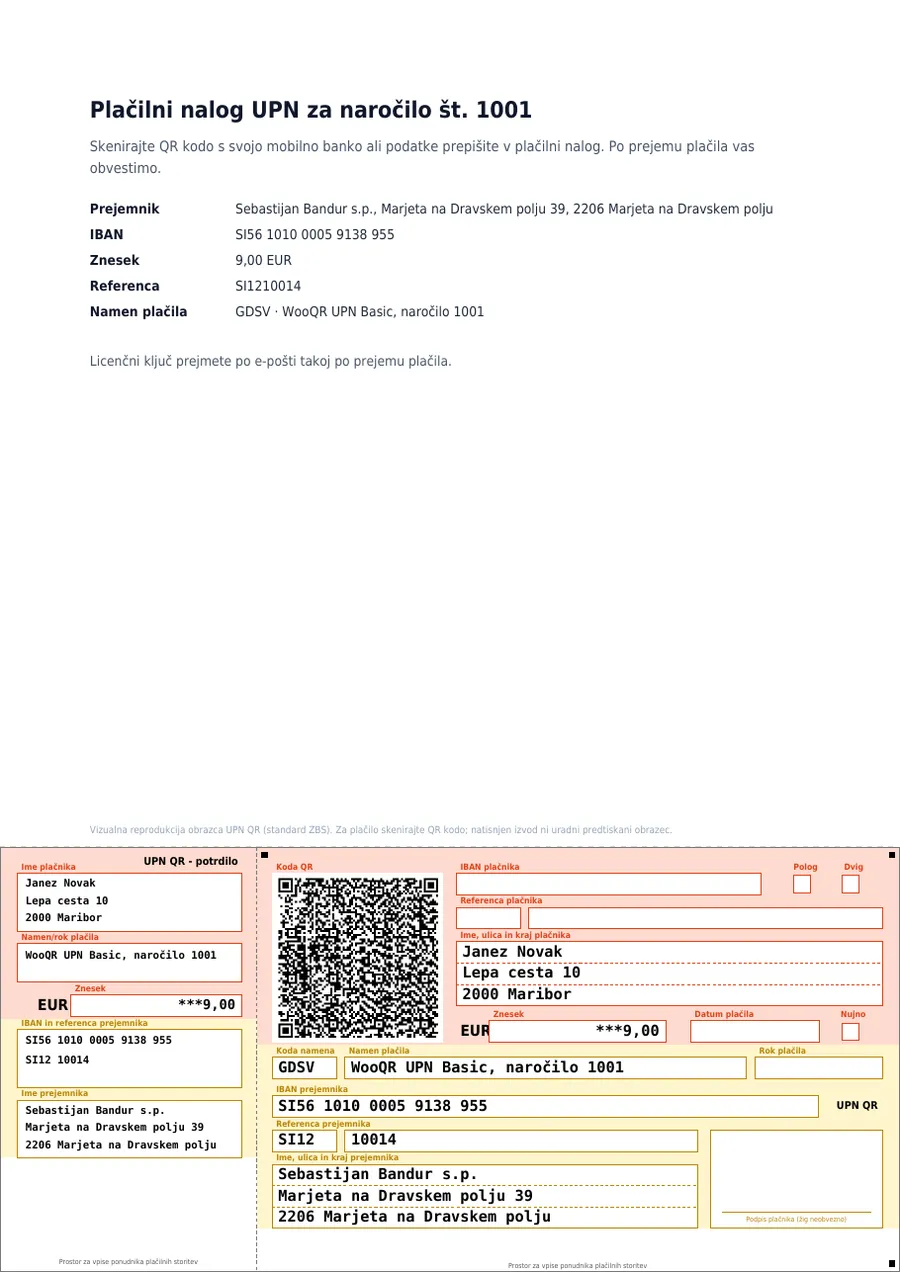
A4 PDF: letter with order details and the seller's note, UPN QR form at the bottom with a tear-off line

E-mail with PDF attachment

The "order on hold" and "invoice" e-mails carry the UPN slip as a PDF (UPN-payment-order-1001.pdf): an A4 letter with order details, or the bare form. The QR code in the message is embedded, not a remote image, so Outlook and Thunderbird show it even with remote images blocked. Display: QR code with its table, an image of the slip, or a single sentence.

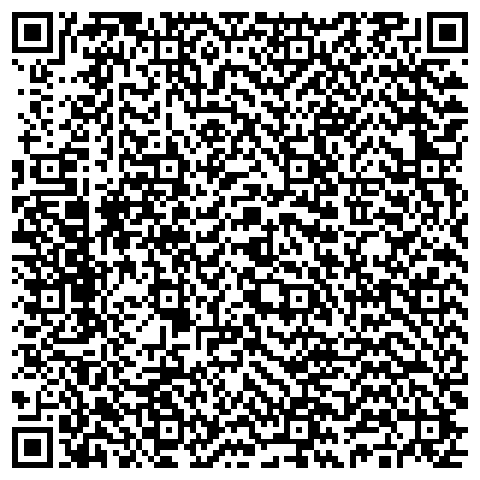
UPN QR code for a EUR 9.00 payment

Thank-you page and shortcode

QR code with a data table, or the full slip across the page width, with a PDF download button and your note. Shortcodes [wooqr_upn_qr] and [wooqr_upn_nalog] for FunnelKit, CartFlows, Elementor and e-mail automations.

WooCommerce → Order #1001
┌ UPN QR code
│ IBAN SI56 1010 0005 9138 955
│ Reference SI12 10014
│ Due 17.10.2026
│ [Download UPN slip (PDF)]
└ Regenerate QR

Admin order screen

A metabox with the QR code, the data and the PDF download. Diagnostics that tell you which file and encoding are on screen, plus a regenerate button for when a page cache serves a stale image.

Spec sheet

What your accountant and your bank would check.

Standard

ZBS UPN QR v2, down to the last byte

Twenty lines, ISO-8859-2 with the ECI 000004 header, fixed version 15, level M, byte mode, control length in bytes, field length limits per the standard. The same output as the reference generators (Zint, upn-qr.si). Slovenian diacritics č, š, ž render correctly in banking apps.

ISO-8859-2 + ECIv15 / M411 bytesMOD-97 IBAN
UPN slip PDF

UPN slip PDF: the form at the standard's millimetre coordinates

PDF and image come from the same drawing (coordinates A1–A62, coloured payer and recipient sections, machine fill in a monospace face). Receipt and order parts, buyer details, due date, BIC for foreign banks. A4 with a letter and your note, or the bare 210 × 99 mm form.

new in 2.0PDF attachmentimage on pagedownload keyed to order
Deadline & reminders

Payment deadline, reminder or cancellation

Deadline as order date plus N days, on the form and in the QR code. After it passes, if enabled: a reminder with the QR code and the slip, or automatic cancellation, once a day, each order once, with an order note. WooCommerce itself has no deadline for bank transfers.

new in 2.0WP-Cronoff by default
References

Reference (sklic): SI00, SI11, SI12, SI99 and RF

Modulo-11 check digit for SI11 and SI12, international RF per ISO 11649 for the whole SEPA area. The order number is included automatically; an over-long reference is handled safely instead of silently truncated.

Foreign bank

UPN slip for foreign accounts: Revolut, N26, a bank in Austria

Seller with an account outside Slovenia, customers with Slovenian banks: BIC required and shown next to the QR, empty reference, order number in the payment purpose, recipient country in the address, cross-border SEPA transfer in EUR. The standard allows a foreign SEPA IBAN; verify acceptance after scanning with your own bank.

SEPABICOTHR
Privacy

Nothing leaves your server

QR via the phpqrcode library, PDF via tFPDF, both bundled in the plugin. Images and PDFs in a protected folder with unguessable names, deleted once the order is no longer awaiting payment. No data-processing agreements, no calls abroad.

GDPRGDHMAC names
Maintenance

Automatic updates, HPOS, PHP 7.4+

WordPress installs new versions in the background (can be turned off). Compatible with WooCommerce HPOS and checkout blocks. English interface translation; licence e-mails in four languages. IBAN length validation for every SEPA country and BIC validation on input.

Customisation

Note, button, payment method, filters

A custom note under the QR code with placeholders, ISO 20022 purpose code, QR size. The PDF download button with your own text, colour, shape and size, with a live preview. One click renames "Direct bank transfer" at checkout to "UPN payment order with QR code". Twelve developer filters and a documented shortcode; all settings on one page inside WooCommerce.

Free UPN QR generator

UPN QR generator: enter your IBAN, scan with your bank.

The UPN QR generator runs in your browser to the same standard as the plugin in your shop. Enter your IBAN and an amount, open your mobile bank and scan: the bank will offer a transfer to yourself. Nothing is sent anywhere.

The demo uses ASCII characters only, so no ECI header is needed. In the shop the plugin encodes ISO-8859-2 with ECI and renders diacritics correctly.
Enter a valid IBAN to show the QR code.

        Above is the literal payload of the QR code: 19 fields and the control length. This is what the bank sees.
      

Pricing

One-time payment. Perpetual usage licence.

Basic

€9one-time

  • 1 site
  • All features, incl. the UPN slip PDF
  • Updates for 12 months
  • E-mail support for 12 months
Buy Basic

Agency

€79one-time

  • Unlimited sites
  • All features, incl. the UPN slip PDF
  • Updates for 12 months
  • Priority support for 12 months
Buy Agency
Bank transfer instead of card: send your invoice details, pay the UPN slip, key and invoice arrive after the transfer.

The usage licence is perpetual; the plugin keeps working after the updates window ends. Updates and support are included for 12 months; renewing for another 12 months is optional and 15% cheaper (Basic €7.65, Pro €24.65, Agency €67.15), from the licence portal. We remind you by e-mail before expiry; nothing is charged automatically. Buyers up to 8 October 2026 keep lifetime updates.

Prices exclude VAT (the seller is not VAT-registered, Article 94 of the Slovenian VAT Act). Payment via Stripe: card, Apple Pay, Google Pay. 14-day no-questions refund. The licence key arrives by e-mail right after payment.

Frequently asked

What you probably want to know.

What is a UPN QR code (universal payment order with QR code)?

UPN (univerzalni plačilni nalog) is the universal payment order, Slovenia's standard bank-transfer form. The UPN QR code is the QR code on that form which, per the Bank Association of Slovenia's technical standard (ZBS UPN QR), carries all payment data: recipient IBAN, amount, reference, purpose and due date. The payer scans it in a mobile banking app and the transfer is filled in without typing. WooQR UPN produces that code and the full slip for every WooCommerce bank-transfer order.

Is this the "položnica" (payment slip) with a QR code?

Colloquially, yes. "Položnica" is the everyday Slovenian word for a payment slip; the official form is the UPN and its QR code is UPN QR. The plugin hands your customer exactly that on the thank-you page and in the e-mail: a payment slip with a QR code for the order, scanned instead of retyping the IBAN and reference.

Is there a free UPN plugin for WooCommerce?

Yes. The free GR UPN payment form on wordpress.org sends a UPN form with QR code manually from the order actions menu; automatic display, e-mail and shortcodes are in its paid version. WooQR UPN at €9 one-time does everything automatically: QR code and UPN slip PDF on the thank-you page and in e-mails, payment deadline with reminder or cancellation, foreign bank mode, custom note, shortcodes for FunnelKit and Elementor, and automatic updates. You can check the standard with the generator above before buying, and there is a 14-day refund.

Which mobile banking apps read the UPN QR codes?

The codes follow the ZBS UPN QR v2 technical standard that every Slovenian mobile bank reads.

Confirmed in production (real customers paying live): Intesa Sanpaolo, Delavska hranilnica.

Per the standard (same format, no individual live test): NLB Klik, mBills, OTP banka (formerly Nova KBM and SKB), Gorenjska banka, Addiko, Sparkasse, BKS Bank, Deželna banka Slovenije, LON, savings banks.

If you hit a problem with any bank, tell us; we fix it within a day or refund within 14 days.

Does the customer get the full UPN payment slip, not just a QR code?

Yes (since 2.0). The plugin produces a PDF of the UPN QR form per the ZBS standard: receipt and order parts, QR code, recipient, amount, reference, purpose, due date, and the buyer's name and address from the order. The PDF is attached to the same e-mails as the QR code, the thank-you page has a download button, and the slip can be shown as an image instead of the QR code. A printed copy is not the official pre-printed form; payment happens by scanning the QR code.

What data do you process? Does anything go to a third-party server?

Nothing. The QR code and the PDF are generated locally on your WordPress server with two libraries bundled in the plugin. IBAN, amount, reference and recipient name never leave your infrastructure. The QR code holds recipient data only; payer fields stay empty and the bank fills them from the account the customer pays from.

The only outbound call is the daily licence check to our server (key and site address), with no order data.

I bank outside Slovenia (Revolut, N26, Austria…) but sell to Slovenian customers. Does it work?

Yes. Enable "I have a foreign bank" and choose the recipient's country of registration. The payment then becomes a cross-border SEPA transfer in EUR: the plugin requires a BIC and shows it next to the QR code (the UPN QR standard has no BIC field; the customer's bank derives it from the IBAN), the reference is left empty (foreign banks do not know Slovenian SI models), and the order number goes into the payment purpose. The recommended purpose code is OTHR.

The standard allows a foreign SEPA IBAN in the QR code, but acceptance after scanning is not yet confirmed with every Slovenian mobile bank. Do a test scan with your own bank before selling.

What happens after 12 months? Does the plugin stop working?

No. The usage licence is perpetual; QR codes and slips keep being generated without limits. After 12 months only the updates-and-support window ends: new versions and e-mail support are available after an optional 12-month renewal, 15% below the regular price (Basic €7.65, Pro €24.65, Agency €67.15). A month, a week, three days and one day before expiry you get an e-mail reminder with a renewal link; nothing is charged without your click. The expiry date is shown in WP Admin → WooCommerce → UPN QR → Licence. Buyers up to 8 October 2026 have lifetime updates.

Can the plugin send a reminder or cancel an unpaid order?

It can, if you enable it. WooCommerce itself has no payment deadline for bank transfers; the plugin checks unpaid orders once a day, finds those older than the deadline plus your grace days, and either sends a reminder (e-mail with the QR code and the UPN slip attached) or cancels the order. Each order is handled once and gets an order note. Off by default.

Does the QR code show in Outlook and Thunderbird e-mails?

Yes. The QR code (or the slip image) is embedded in the message as an inline attachment, not linked from the server. Clients that block remote images therefore show it without a "load images" click, and it stays visible after the order is paid and the plugin removes the files from the server. Works with every sender that goes through PHPMailer (WordPress, SMTP plugins); for the rare API senders there is a switch to a link in the settings. The PDF is attached as well.

Does it work with FunnelKit, CartFlows, Elementor and custom e-mail templates?

Yes. Besides the automatic output in the standard WooCommerce hooks, two shortcodes place the same block anywhere: QR code with its table or the full UPN slip, the PDF button and your note.

  • [wooqr_upn_nalog] — the full UPN slip on a custom thank-you page (FunnelKit, CartFlows, Elementor, Bricks); the order is detected automatically
  • [wooqr_upn_qr mode="qr"] — QR code with the data table
  • [wooqr_upn_nalog email="1"] — a template replacing the WooCommerce e-mail
  • [wooqr_upn_nalog order_id="{{order_id}}" key="{{order_key}}" email="1"] — background e-mail automation (FunnelKit Automations, Klaviyo…)

An explicit order_id without the order key renders nothing, on purpose. The full documentation with every filter is in the plugin settings, Shortcode tab.

Is it Slovenia-only? What about EU customers?

UPN QR is the Slovenian standard for customers with a Slovenian mobile bank. Other countries use their own formats (Croatia HUB-3A, Germany and Austria EPC QR, Czechia SPAYD). For a Slovenian shop that also sells in the EU: Slovenian customers scan the QR, EU customers pay by a regular SEPA transfer, and IBAN and BIC are in the e-mail anyway. We will add EPC QR or HUB-3A if there is enough demand.

What are the requirements?

WordPress 6.0+, PHP 7.4+ with the GD extension (standard on every Slovenian host), WooCommerce 7.0+. HPOS compatible. No external dependencies.

Does it change my existing payment process?

No. The plugin only adds the QR code and the UPN slip to your existing bank-transfer payment method. The customer can still pay manually; the QR is an extra, faster path. Paid or cancelled orders no longer show the code, so there are no double transfers.

What if it is not for me, do I get my money back?

Yes, within 14 days of purchase without giving a reason (Article 43 of the Slovenian Consumer Protection Act). Write to [email protected].

How do I get the licence key after buying?

Right after paying via Stripe you receive an e-mail with the key and the download link. Enter the key under WooCommerce → UPN QR → Licence and click "Verify licence". You can see your key and activated sites any time in the licence portal, which you sign in to with your e-mail address.

Who is behind it

Written and maintained by one person you can actually reach.

Računalničar, Sebastijan Bandur s.p.

Marjeta na Dravskem polju, Slovenia. I build WordPress and WooCommerce plugins for Slovenian online shops; WooQR UPN exists because customers in my own shops kept mistyping references. I read the whole ZBS standard, verify QR codes in real banking apps, and this page separates what is confirmed from what is not.

Support: [email protected] · usually answered the same working day · racunalnicar.eu

Less typing for customers, less payment-hunting for you.

Order by bank transfer

For companies and sole traders paying by bank transfer. You get an order number and a UPN QR code right away; once the transfer arrives we send the licence key and the invoice to the e-mail address you enter.

Your data is used only to issue the licence and the invoice.